额外 — 扩展 API
📎 附加实验 — 不是 Copilot SDK。 本实验涵盖了演示应用程序中的 FastAPI、SQLModel 和 pytest。它展示了 Copilot 作为 编程助手 的功能,但没有触及 Copilot SDK。
目标: 使用 Copilot 添加一个新的端点及其测试,保持现有的 30 个测试为绿色,并保留故意的代码异味。
时间: ~30分钟
先决条件: Lab 01 — 环境配置 已完成,Python 应用可运行。
If 你 完成 了 共享 的 治理钩子 附加 实验, 工作 时 请 保留 那些 钩子 的 启用。
⚠️ 基本规则
- 不要修复这四个故意的异味。 后续的演示依赖它们。如果 Copilot 提议清理
get_transactions_with_segments,拒绝。 - 保持所有14个现有测试通过。 新增的测试数量也包含在内。
- 遵循现有的 Python 规范:薄路由器、SQLModel / Pydantic DTOs、异步服务方法、pytest 固定项,以及
AGENTS.md中的约定。
你将构建什么
GET /api/segments/summary — 全部段落的综合统计指标:
{
  "totalSegments": 4,
  "totalCustomers": 4660,
  "weightedAverageRetention": 0.71,
  "highestRetention": "High Value",
  "lowestRetention": "At Risk"
}
刻意不是简单的转发:加权平均值必须根据客户数量来加权,这正是值得进行测试的类型。
步骤 1 — 研究现有结构
cd src/AgentOrchestrator-python
cat app/routers/segments.py
cat app/services/retail_analytics.py
cat app/models.py
cat app/main.py
注意要模仿的模式:
APIRouter(prefix="/api/segments", tags=["segments"])- 通过
Depends(get_service)进行依赖注入 response_model=...在路由装饰器上HTTPException(status_code=404)因资源缺失而出现- 路由保持简洁;逻辑存在于
RetailAnalyticsService app/main.py通过一个生命周期处理器播种,并将静态UI挂载到/最后,以避免遮蔽/api路由。
步骤 2 — 知道 Python 的差异
模型位于app/models.py,并使用SQLModel。⚠️ SQLModel 跳过对table=True类的验证,因此受约束的事务字段位于TransactionBase;Transaction(表)和TransactionCreate(请求体)都继承自它。
JSON 是 驼峰式 在传输格式 (customerId, 不是 customer_id) 通过 Pydantic 的 alias_generator=to_camel 配置来实现。此举故意保留了 .NET HTTP 合约,以便相同的 curl 命令能够适用于两种堆栈。
测试使用 pytest 与内存中的 SQLite 引擎和 StaticPool 在 tests/conftest.py 中。StaticPool 保持每个连接都指向同一个内存数据库,这正是 .NET 侧的 OpenConnection() 所实现的。有 14 个 pytest 测试,与 .NET 路线中的 14 个 xUnit 测试匹配。
步骤 3 — 添加 DTO
将此响应模型添加到 app/models.py:。
class SegmentSummary(BaseModel):
    """Portfolio-level statistics across all customer segments."""

    model_config = CAMEL_CONFIG

    total_segments: int
    total_customers: int
    weighted_average_retention: float
    highest_retention: str
    lowest_retention: str
A BaseModel 是足够的,因为这是 API 的结构,而不是 SQLite 表格。共享的 CAMEL_CONFIG 保持响应为 totalSegments 和 weightedAverageRetention。
第 4 步 — 添加服务方法
询问 Copilot,提前给出限制条件:
Add an async get_segment_summary method to RetailAnalyticsService that returns a
SegmentSummary. Weight the average retention by customer_count, not a plain
mean. Handle the empty-segment case without throwing. Follow the existing
conventions in this file. Do not modify any other method.
你所追求的结构:
async def get_segment_summary(self) -> SegmentSummary:
    segments = await self.get_segments()
    if not segments:
        return SegmentSummary(
            total_segments=0, total_customers=0, weighted_average_retention=0,
            highest_retention="", lowest_retention="",
        )

    total_customers = sum(s.customer_count for s in segments)
    weighted = 0 if total_customers == 0 else (
        sum(s.retention_rate * s.customer_count for s in segments) / total_customers
    )

    return SegmentSummary(
        total_segments=len(segments),
        total_customers=total_customers,
        weighted_average_retention=round(weighted, 2),
        highest_retention=max(segments, key=lambda s: s.retention_rate).name,
        lowest_retention=min(segments, key=lambda s: s.retention_rate).name,
    )
⚠️ 保护分界线。 total_customers 为零会引发。一个空的表格在种子后不太可能,但测试可以构造一个——并且一个评审者会问。
第 5 步 — 添加端点
在 app/routers/segments.py,导入 SegmentSummary 以及添加:
@router.get("/summary", response_model=SegmentSummary)
async def summary(
    service: RetailAnalyticsService = Depends(get_service),
) -> SegmentSummary:
    return await service.get_segment_summary()
⚠️ 路由顺序。 将 /summary 放在 /{segment_id} 之前。FastAPI 路由按照声明顺序进行检查,否则通用的段路由可以先看到 summary,而验证会拒绝它是一个非整数的 ID。
第 6 步 — 写测试
Ask Copilot为服务测试提出 tests/test_retail_analytics.py:
Add pytest tests for get_segment_summary. Cover: the seeded four-segment case,
correct weighted average (not a plain mean), and an empty database returning
zeros without throwing. The fixture starts empty, so seed explicitly.
使用种子数据:
| 段落 | 客户 | 保留 |
|---|---|---|
| 高价值 | 150 | 0.92 |
| 常规 | 3,200 | 0.78 |
| 风险中 | 890 | 0.45 |
| 新 | 420 | 0.65 |
一个简单的平均值是0.70。加权后的数值是(150×0.92 + 3200×0.78 + 890×0.45 + 420×0.65) / 4660 ≈ 0.71。
async def test_get_segment_summary_weights_retention_by_customer_count(
    service: RetailAnalyticsService,
) -> None:
    await service.seed_data()

    summary = await service.get_segment_summary()

    assert summary.total_segments == 4
    assert summary.total_customers == 4660
    assert summary.highest_retention == "High Value"
    assert summary.lowest_retention == "At Risk"
    assert summary.weighted_average_retention == 0.71
    assert summary.weighted_average_retention != 0.70
💡 也添加一个空数据库测试,该测试断言 highest_retention 和 lowest_retention 的总和为零以及为空字符串。
第 7 步 — 检查代码和测试
预期结果:Ruff 清理干净,pytest 报告超过 14 个通过,没有失败。
⚠️ 如果一个先前通过的测试现在失败了,说明新代码之外的其他地方发生了变化。检查差异:
只有app/models.py、app/services/retail_analytics.py、app/routers/segments.py和测试文件应出现。
第 8 步 — 验证其是否运行
curl -s http://localhost:5070/api/segments/summary | jq
curl -s http://localhost:5070/api/segments | jq 'length'          # 4
curl -s http://localhost:5070/api/segments/predict/C003 | jq -r .predictedSegment
确认摘要数字与上方的表格匹配。
由于 FastAPI 从你的类型提示中获取 OpenAPI,新的路由也会在 http://localhost:5070/docs 的交互式文档中出现 —— 你声明的响应模型将成为文档化的 schema:
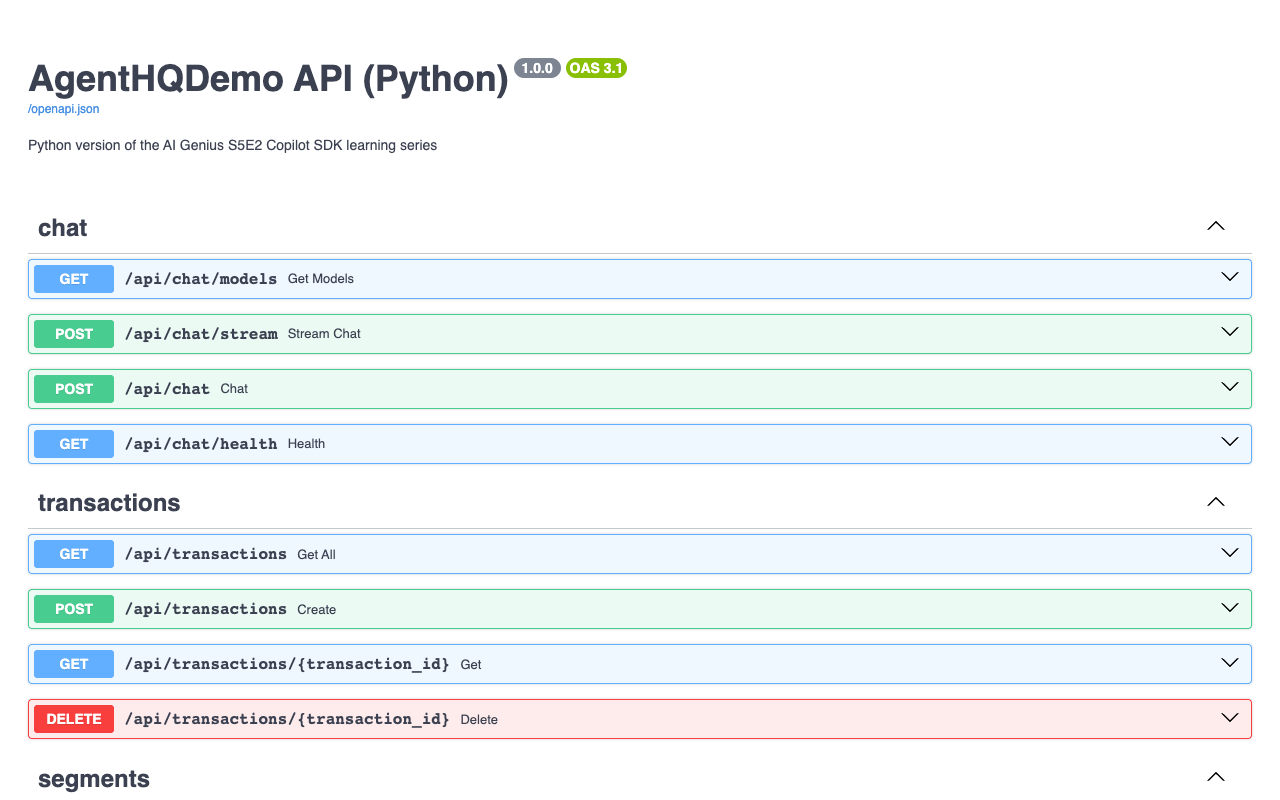
💡 .NET 技术路线通过其 OpenAPI 文档呈现相同的理念。不同之处在于这里的数据模式来自 Pydantic 模型和 Python 类型提示,而不是 C# 属性。
第 9 步 —— 再次检查 HTTP 契约
FastAPI 的验证方式在一处显而易见:无效输入返回 HTTP 422,伴随着 Pydantic 错误体,而 .NET 版本则从 ModelState 返回 400。
真实的验证无效输入输出:
$ curl -X POST http://localhost:5070/api/transactions \
    -H 'Content-Type: application/json' \
    -d '{"customerId":"C777","amount":-5,"productCategory":"Grocery","storeId":"S001"}'
{"detail":[{"type":"greater_than_equal","loc":["body","amount"],"msg":"Input should be greater than or equal to 0.01","input":-5,"ctx":{"ge":0.01}}]}
一个有效的创建返回 HTTP 201。一个验证过的运行返回:
{"productCategory":"Grocery","customerId":"C777","amount":42.5,"isFlagged":false,"storeId":"S001","id":11,"timestamp":"2026-08-13T04:59:38.478798"}
清理和未找到行为:
curl -X DELETE http://localhost:5070/api/transactions/11   # HTTP 204, no body
curl -s http://localhost:5070/api/transactions/999
第 10 步 — 审阅自己的更改
copilot -p "Review my uncommitted Python changes for correctness, FastAPI route ordering, SQLModel/Pydantic validation, and pytest coverage. Report only." --allow-all-tools
然后更新根目录下的README.md文件中的API表,该文件位于此链接,以包含新的端点——文档漂移是一个审查发现。
✅ 检查点
- [x] 新的响应 DTO、服务方法和端点已添加
- [x] 测试覆盖加权平均和空情况
- [x] 所有原始的 30 个测试仍然通过
- [x] 四个有意为之的臭味未被触及
- [x] 端点已在端口 5070 上运行的 API 上进行验证
- [x] 现有的验证、创建、删除和 404 行为仍然符合预期
💡 拓展练习
添加 GET /api/transactions/summary — 产品类别和店铺的总计
考虑在<code>get_transactions_with_segments</code>中是否会触发N+1模式 get_transactions_with_segments,确保它不会发生。